# ClickHouse Basic Tutorial: An Introduction
This is the first part of the **ClickHouse Tutorial Series**. In this series, I cover some practical and vital aspects of the ClickHouse database, a robust OLAP technology many enterprise companies utilize.
In this part, I'll talk about the main features, weaknesses, installation, and usage of ClickHouse. I'll also refer to some helpful links for those who want to dive into broader details.
## What is ClickHouse
ClickHouse is an open-source column-oriented database developed by Yandex. It is designed to provide high performance for analytical queries. ClickHouse uses a SQL-like query language for querying data and supports different data types, including integers, strings, dates, and floats. It offers various features such as clustering, distributed query processing, and fault tolerance. It also supports replication and data sharding. ClickHouse is used by companies such as Yandex, Facebook, and Uber for data analysis, machine learning, and more.
### Main Features
The main features of Clickhouse Database are:
#### Column-Oriented
Data in ClickHouse is stored in [columns instead of rows](https://clickhouse.com/docs/en/about-us/distinctive-features#true-column-oriented-database-management-system), bringing at least two benefits:
1. Every column can be sorted in a separate file; hence, stronger compression happens on each column and the whole table.
2. In range queries common in analytical processing, the system can access and process data easier since data is sorted in some columns (i.e., columns defined as sort keys). Additionally, it can parallelize processes on multi-cores while loading massive columns.
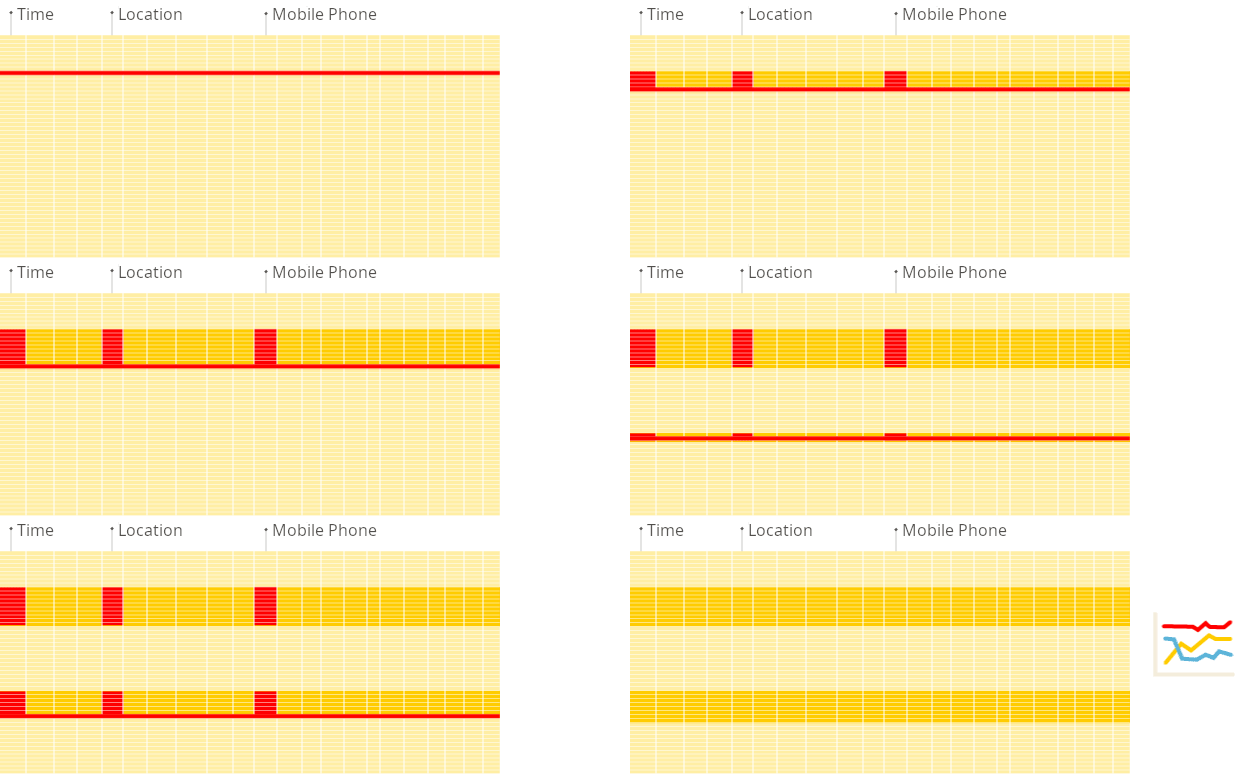
*Row-Oriented Database (Gif by* [*ClickHouse*](https://clickhouse.com/docs/en/faq/general/columnar-database)*)*
---

*Columnar Database (Gif by * [*ClickHouse*](https://clickhouse.com/docs/en/faq/general/columnar-database)*)*
> Note: It should not get mistaken with Wide-Column databases like Cassandra as they store data in rows but enable you to denormalize intensive data in a table with many columns leading to a No-SQL structure.
#### Data Compression
Thanks to compression algorithms ([zstd](https://github.com/facebook/zstd) and [LZ4](https://github.com/lz4/lz4)), data occupies much less storage, even more than 20x smaller! You can study some of the benchmarks on ClickHouse and other databases storage [here](https://benchmark.clickhouse.com/#eyJzeXN0ZW0iOnsiQXRoZW5hIChwYXJ0aXRpb25lZCkiOnRydWUsIkF0aGVuYSAoc2luZ2xlKSI6dHJ1ZSwiQXVyb3JhIGZvciBNeVNRTCI6dHJ1ZSwiQXVyb3JhIGZvciBQb3N0Z3JlU1FMIjp0cnVlLCJCeXRlSG91c2UiOnRydWUsIkNpdHVzIjp0cnVlLCJjbGlja2hvdXNlLWxvY2FsIChwYXJ0aXRpb25lZCkiOnRydWUsImNsaWNraG91c2UtbG9jYWwgKHNpbmdsZSkiOnRydWUsIkNsaWNrSG91c2UgKHdlYikiOnRydWUsIkNsaWNrSG91c2UiOnRydWUsIkNsaWNrSG91c2UgKHR1bmVkKSI6dHJ1ZSwiQ2xpY2tIb3VzZSAoenN0ZCkiOnRydWUsIkNsaWNrSG91c2UgQ2xvdWQiOnRydWUsIkNyYXRlREIiOnRydWUsIkRhdGFiZW5kIjp0cnVlLCJEYXRhRnVzaW9uIChzaW5nbGUpIjp0cnVlLCJBcGFjaGUgRG9yaXMiOnRydWUsIkRydWlkIjp0cnVlLCJEdWNrREIgKFBhcnF1ZXQpIjp0cnVlLCJEdWNrREIiOnRydWUsIkVsYXN0aWNzZWFyY2giOnRydWUsIkVsYXN0aWNzZWFyY2ggKHR1bmVkKSI6ZmFsc2UsIkdyZWVucGx1bSI6dHJ1ZSwiSGVhdnlBSSI6dHJ1ZSwiSHlkcmEiOnRydWUsIkluZm9icmlnaHQiOnRydWUsIktpbmV0aWNhIjp0cnVlLCJNYXJpYURCIENvbHVtblN0b3JlIjp0cnVlLCJNYXJpYURCIjpmYWxzZSwiTW9uZXREQiI6dHJ1ZSwiTW9uZ29EQiI6dHJ1ZSwiTXlTUUwgKE15SVNBTSkiOnRydWUsIk15U1FMIjp0cnVlLCJQaW5vdCI6dHJ1ZSwiUG9zdGdyZVNRTCAodHVuZWQpIjpmYWxzZSwiUG9zdGdyZVNRTCI6dHJ1ZSwiUXVlc3REQiAocGFydGl0aW9uZWQpIjp0cnVlLCJRdWVzdERCIjp0cnVlLCJSZWRzaGlmdCI6dHJ1ZSwiU2VsZWN0REIiOnRydWUsIlNpbmdsZVN0b3JlIjp0cnVlLCJTbm93Zmxha2UiOnRydWUsIlNRTGl0ZSI6dHJ1ZSwiU3RhclJvY2tzIjp0cnVlLCJUaW1lc2NhbGVEQiAoY29tcHJlc3Npb24pIjp0cnVlLCJUaW1lc2NhbGVEQiI6dHJ1ZX0sInR5cGUiOnsic3RhdGVsZXNzIjp0cnVlLCJtYW5hZ2VkIjp0cnVlLCJKYXZhIjp0cnVlLCJjb2x1bW4tb3JpZW50ZWQiOnRydWUsIkMrKyI6dHJ1ZSwiTXlTUUwgY29tcGF0aWJsZSI6dHJ1ZSwicm93LW9yaWVudGVkIjp0cnVlLCJDIjp0cnVlLCJQb3N0Z3JlU1FMIGNvbXBhdGlibGUiOnRydWUsIkNsaWNrSG91c2UgZGVyaXZhdGl2ZSI6dHJ1ZSwiZW1iZWRkZWQiOnRydWUsInNlcnZlcmxlc3MiOnRydWUsIlJ1c3QiOnRydWUsInNlYXJjaCI6dHJ1ZSwiZG9jdW1lbnQiOnRydWUsInRpbWUtc2VyaWVzIjp0cnVlfSwibWFjaGluZSI6eyJzZXJ2ZXJsZXNzIjp0cnVlLCIxNmFjdSI6dHJ1ZSwiTCI6dHJ1ZSwiTSI6dHJ1ZSwiUyI6dHJ1ZSwiWFMiOnRydWUsImM2YS40eGxhcmdlLCA1MDBnYiBncDIiOnRydWUsImM1bi40eGxhcmdlLCAyMDBnYiBncDIiOnRydWUsImM1LjR4bGFyZ2UsIDUwMGdiIGdwMiI6dHJ1ZSwiYzZhLm1ldGFsLCA1MDBnYiBncDIiOnRydWUsIjE2IHRocmVhZHMiOnRydWUsIjIwIHRocmVhZHMiOnRydWUsIjI0IHRocmVhZHMiOnRydWUsIjI4IHRocmVhZHMiOnRydWUsIjMwIHRocmVhZHMiOnRydWUsIjQ4IHRocmVhZHMiOnRydWUsIjYwIHRocmVhZHMiOnRydWUsIm01ZC4yNHhsYXJnZSI6dHJ1ZSwiYzZhLjR4bGFyZ2UsIDE1MDBnYiBncDIiOnRydWUsInJhMy4xNnhsYXJnZSI6dHJ1ZSwicmEzLjR4bGFyZ2UiOnRydWUsInJhMy54bHBsdXMiOnRydWUsImRjMi44eGxhcmdlIjp0cnVlLCJTMiI6dHJ1ZSwiUzI0Ijp0cnVlLCIyWEwiOnRydWUsIjNYTCI6dHJ1ZSwiNFhMIjp0cnVlLCJYTCI6dHJ1ZX0sImNsdXN0ZXJfc2l6ZSI6eyIxIjp0cnVlLCIyIjp0cnVlLCI0Ijp0cnVlLCI4Ijp0cnVlLCIxNiI6dHJ1ZSwiMzIiOnRydWUsIjY0Ijp0cnVlLCIxMjgiOnRydWUsInNlcnZlcmxlc3MiOnRydWUsInVuZGVmaW5lZCI6dHJ1ZX0sIm1ldHJpYyI6InNpemUiLCJxdWVyaWVzIjpbdHJ1ZSx0cnVlLHRydWUsdHJ1ZSx0cnVlLHRydWUsdHJ1ZSx0cnVlLHRydWUsdHJ1ZSx0cnVlLHRydWUsdHJ1ZSx0cnVlLHRydWUsdHJ1ZSx0cnVlLHRydWUsdHJ1ZSx0cnVlLHRydWUsdHJ1ZSx0cnVlLHRydWUsdHJ1ZSx0cnVlLHRydWUsdHJ1ZSx0cnVlLHRydWUsdHJ1ZSx0cnVlLHRydWUsdHJ1ZSx0cnVlLHRydWUsdHJ1ZSx0cnVlLHRydWUsdHJ1ZSx0cnVlLHRydWUsdHJ1ZV19).

*ClickHouse columnar structure leads to storing and reading columns more efficiently (Graph by* [*Altinity*](https://altinity.com/blog/using-clickhouse-as-an-analytic-extension-for-mysql)*)*
#### Scalability
ClickHouse scales well both vertically and horizontally. It can be scaled by adding [extra replicas](https://altinitydb.medium.com/clickhouse-for-time-series-scalability-benchmarks-e181132a895b) and extra shards to process queries in a distributed way. ClickHouse supports multi-master asynchronous replication and can be deployed across multiple data centers. All nodes are equal, which allows for avoiding having single points of failure.
### Weaknesses
To mention some:
* Lack of full-fledged UPDATE/DELETE implementation: ClickHouse is unsuited for modification and mutations. So you'll come across poor performance regarding those kinds of queries.
* OLTP queries like pointy ones would not make you happy since ClickHouse is easily outperformed by traditional RDBMSs like MySQL with those queries.
### Rivals and Alternatives
To name a few:
* Apache Druid
* ElasticSearch
* SingleStore
* Snowflake
* TimescaleDB
Surely, each one is suitable for different use cases and has its pros and cons, but I won't discuss their comparison here. However, you can study some valuable benchmarks [here](https://benchmark.clickhouse.com/) and [here](https://www.timescale.com/blog/what-is-clickhouse-how-does-it-compare-to-postgresql-and-timescaledb-and-how-does-it-perform-for-time-series-data/).
## Quick Start
### Installation
I only cover the Docker approach here. For other methods on different distros, please follow [ClicHouse's official Installation.](https://clickhouse.com/docs/en/install)
The docker-compose file:
```yml
version: '2'
services:
clickhouse:
container_name: myclickhouse
image: clickhouse/clickhouse-server:latest
ports:
- "8123:8123"
- "9000:9000"
volumes:
- ./clickhouse-data:/var/lib/clickhouse/
restart: unless-stopped
```
And then run it by:
```bash
docker compose up -d
```
As you can see, two ports have been exposed:
* **8123**: HTTP API Port for HTTP requests, used by JDBC, ODBC, and web interfaces.
* **9000**: Native Protocol port (ClickHouse TCP protocol). Used by ClickHouse apps and processes like *clickhouse-server*, *clickhouse-client*, and native ClickHouse tools. Used for inter-server communication for distributed queries.
It's up to your client driver to choose one of them. For example, [DBeaver](https://dbeaver.io/) uses 8123, and [Python ClickhHouse-Driver](https://clickhouse-driver.readthedocs.io/en/latest/) uses 9000.
To continue the tutorial, we use ClickHouse-Client available on the installed server:
```bash
docker exec -it myclickhouse clickhouse-client
```
### Database and Table Creation
Create database test:
```sql
CREATE DATABASE test;
```
create table `orders`:
```sql
CREATE TABLE test.orders
(`OrderID` Int64,
`CustomerID` Int64,
`OrderDate` DateTime,
`Comments` String,
`Cancelled` Bool)
ENGINE = MergeTree
PRIMARY KEY (OrderID, OrderDate)
ORDER BY (OrderID, OrderDate, CustomerID)
SETTINGS index_granularity = 8192;
```
In the next parts, we'll talk about other configurations like `Engine`, `PRIMARY KEY`, `ORDER BY`, etc.
### Insert Data
To insert sample data:
```sql
INSERT INTO test.orders
VALUES (334, 123, '2021-09-15 14:30:00', 'some comment',
false);
```
### Read Data
Just like any other SQL query:
```sql
SELECT OrderID, OrderDate FROM test.orders;
```
## Conclusion
In the first part of the *ClickHouse Tutorial Series*, we discussed the traits, features, and weaknesses of ClickHouse. Then we saw how to set up an instance with minimum configuration, create a database and table, insert data into it, and read from it.
## Useful Links
* [Getting Started with ClickHouse](https://dev.to/taw/getting-started-with-clickhouse-3nf9) [by Tomasz Wegrzanowski](https://dev.to/taw/getting-started-with-clickhouse-3nf9)
* [Introduction to ClickHouse](https://dev.to/olena_kutsenko/introduction-to-clickhouse-8em) by [olena\_kutsenko](https://dev.to/olena_kutsenko)
---
*Originally published at* [*https://dev.to*](https://dev.to/hoptical/clickhouse-basic-tutorial-an-introduction-52il) *on April 13, 2023.*